Skip to content
All products

Configuration assurance for monday.com

BoardDrift: monday.com board configuration drift audit

See what drifted before you repair anything.

Compare a reference board with a deployed board and turn silent configuration drift into a reviewable change list.

No provider token needed for the sample
No sample storage during preview
No live writes in first release
Explainable output with limits shown
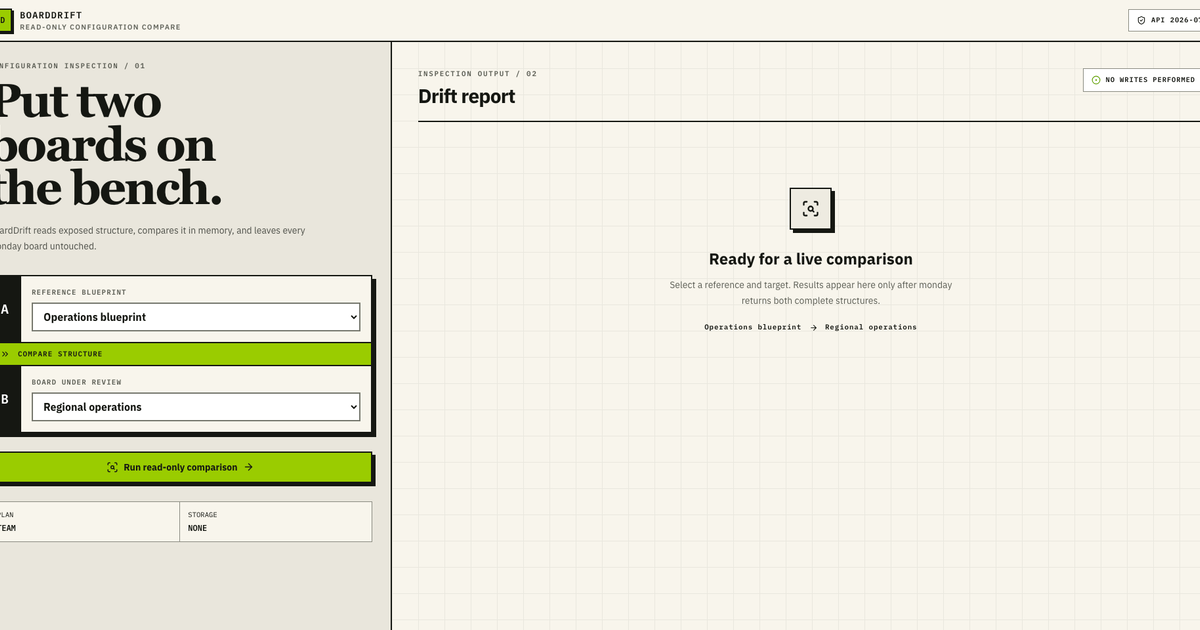
BoardDrift sample interface showing a read-only monday.com board structure comparison.
Public sample interface · fictional data · no provider account connected

PURPOSE / BOUNDARY

What BoardDrift helps a team decide

monday.com operations teams, solution partners, and workspace owners who maintain repeatable board templates.

  • Compare deployed board columns, groups, views, labels, and permissions with a reference structure.
  • Classify each difference as added, removed, or changed and retain the rule behind the finding.
  • Review a read-only drift report before deciding whether any live board should change.

BUYER CHECK / RECOGNIZE THE PROBLEM

When BoardDrift is worth evaluating

Signals the current process is breaking down

  • Boards cloned from one operating template now use different labels, groups, views, or permission modes.
  • Teams report inconsistent workflow outcomes, but no one can show the exact structural difference between boards.
  • A rollout, handover, or governance review needs evidence that deployed boards still match the agreed blueprint.

Who it is for

monday.com operations teams, solution partners, and workspace owners who maintain repeatable board templates.

Who it is not for

Not for teams seeking automatic board repair, item-content reconciliation, or a replacement for backup and audit-log controls.

FROM MANUAL REVIEW TO OUTPUT

A repeatable path to a decision

Why the current manual approach fails

Screenshot checklists and spreadsheet inventories become stale as soon as a board changes. They also make permissions, label sets, and view settings hard to compare consistently. BoardDrift turns both structures into the same review model and keeps the exact rule beside each finding.

  1. Choose the reference

    Use the approved blueprint structure as the comparison baseline.

  2. Read the target

    Normalize the deployed board structure into comparable columns, groups, views, labels, and permissions.

  3. Review the delta

    Inspect categorized added, removed, and changed objects before any remediation decision.

READ-ONLY PREVIEW
NO ACCOUNT CONNECTION

INPUT / SAMPLE FIXTURE

Run the working analysis

Edit the sample if you want. This preview is processed in memory and is not saved.

No writes, payments, messages, or provider changes.

OUTPUT / EVIDENCE

00

No analysis yet

Run the supplied sample to see prioritized, explainable findings here.

USE CASES / HONEST LIMITS

Where the first release fits

Good first use cases

  • Check regional or departmental boards before a process rollout.
  • Validate a customer board after an implementation handover.
  • Investigate why two boards built from the same template now behave differently.

Limits to review before buying

  • The public sample only evaluates the fields shown in its JSON input.
  • Connected coverage depends on monday.com API permissions and the customer’s board configuration.
  • A structural match does not prove that automations, item data, integrations, or human operating practice are correct.

SOURCE-BACKED CONTEXT

Verify the platform facts

Research snapshot: 22 July 2026. monday.com’s official Managed Templates guide lists several objects and changes that do not synchronize to existing instances, while its automation API documentation notes coverage and preview limits. Those platform boundaries are why a connected BoardDrift pilot starts with a read-only feasibility check.

CLEAR ANSWERS / BEFORE CONNECTION

Questions about BoardDrift

The public sample demonstrates the diagnostic rule system. Provider permissions and customer-specific coverage are verified before a connected pilot.

What is monday.com board drift?

Board drift is the gap that develops when a deployed monday.com board no longer matches its agreed reference structure. A changed status label, permission, column, group, or view can alter a workflow without appearing in a conventional task report.

What does BoardDrift compare?

The current sample compares board columns, status labels, groups, views, and board-level permission settings. A connected pilot must first confirm which fields the monday.com API exposes for the customer’s account and board types.

Does BoardDrift change monday.com boards?

No. The public sample uses supplied example JSON and performs no provider calls. The first connected release is designed around read-only diagnosis; a person reviews findings before any separate remediation work.

Is a board comparison the same as a backup?

No. A backup preserves data for recovery. BoardDrift focuses on explainable structural differences between a chosen reference and target board; it does not replace monday.com backup, audit-log, or governance controls.

PRACTICAL GUIDES

Explore the workflow before a pilot

PAID VALIDATION GATE

The connected edition opens after a feasibility review.

We verify API coverage, permissions, data retention, and the exact paid workflow before connecting production accounts. This keeps early customers out of an unsafe beta.

Indicative launch pricing: From $99 per account / month. Final scope, price, tax, deliverables, and refund terms are agreed before paid work begins.

Request a paid pilot review